Melon Party : Fruit Maker1.1.4
Publisher Description
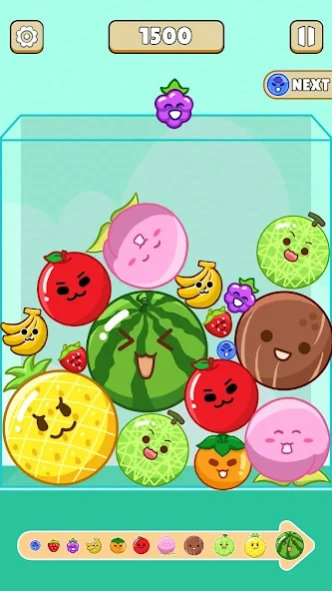


Classic gameplay merge melon as big as you can - Watermelon drop fruit bacon -
🍉The hot Melon party mini-game in 2024, merge to big melon, will bring you a relaxing and pleasant gaming experience. Cute Fruit Merging Game!
Melon Marker Chill Party : Fruit Drop! Enjoy the big melon.
Classic gameplay: 2048 gameplay, can’t stop playing 🔥 .
Tap the screen to drop the fruit and merge the same ones to keep making it bigger and finally match melon.
Who can create the giant watermelon first?
Challenge now!
🍉 How to play:
- Tap on the screen to choose where you want the cloud to drop the fruit
- Merge the same fruit to create a new one
- Merge all fruits to get a big melon and high score
🍉 Features:
🍈 Simple and easy to play: just click to control the landing of the watermelon, and you can combine cute fruits together.
🍈 Experience smoothness: the smooth synthesis effect and the refreshing explosion effect will let you feel the charm of the game during the synthesis process.
🍈 New high score daily: Try your best to get your name in the leaderboard with the highest score!
Download Melon Party : Fruit Maker to challenge your brain now!
About Melon Party : Fruit Maker
The company that develops Melon Party : Fruit Maker is Rainbow 5s Ltd. The latest version released by its developer is 1.1.4.
To install Melon Party : Fruit Maker on your Android device, just click the green Continue To App button above to start the installation process. The app is listed on our website since 2024-06-24 and was downloaded 8 times. We have already checked if the download link is safe, however for your own protection we recommend that you scan the downloaded app with your antivirus. Your antivirus may detect the Melon Party : Fruit Maker as malware as malware if the download link to com.rainbow.melon.merge.block.classic.freegame is broken.
How to install Melon Party : Fruit Maker on your Android device:
- Click on the Continue To App button on our website. This will redirect you to Google Play.
- Once the Melon Party : Fruit Maker is shown in the Google Play listing of your Android device, you can start its download and installation. Tap on the Install button located below the search bar and to the right of the app icon.
- A pop-up window with the permissions required by Melon Party : Fruit Maker will be shown. Click on Accept to continue the process.
- Melon Party : Fruit Maker will be downloaded onto your device, displaying a progress. Once the download completes, the installation will start and you'll get a notification after the installation is finished.
Program Details
System requirements
Download information
Pricing
Version History
version 1.1.4
posted on 2024-06-24
version 1.1.1
posted on 2024-05-02
New PVP mode.
